


Office Chair Buying Guide
As a business owner or office manager, you likely already know that selecting the right office chairs for your workplace is about more than just style and interior design. It also requires balancing concerns like comfort, durability, budget, and the specific needs of your team members.
Of course, there are many different types of chairs available for different aspects and roles, from reception chairs and rolling desk chairs to task chairs, conference chairs, and many more. With countless options available, making an informed decision can feel overwhelming. This office chair buying guide will walk you through the types of office chairs available, what to look for in an office chair, and how to pick an ergonomic chair that keeps you comfortable and productive without wasting your budget.
Why Office Chairs Matter in Your Industry
In construction and manufacturing, downtime costs money. An uncomfortable chair might not seem like a big deal, but it can lead to sore backs, stiff shoulders, and distracted workers. The best office chairs for long hours offer adjustable seat height, seat depth, and lumbar support, which helps your office staff focus on the work that matters.
Think of your chair like a drill or a welder: the right one lasts longer, works better, and makes the job easier.
Types of Office Chairs
Not every chair will hold up to the pace of a shop or jobsite office. Here are some types of office chairs to consider.
| Task Chairs | Ergonomic Chairs | Executive Chairs | Drafting Chairs | Conference Chairs | Reception Chairs |
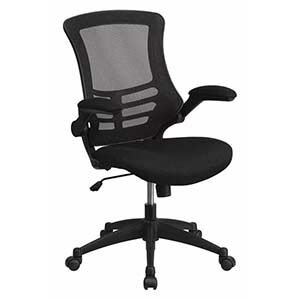 | 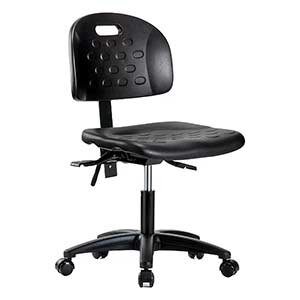 | 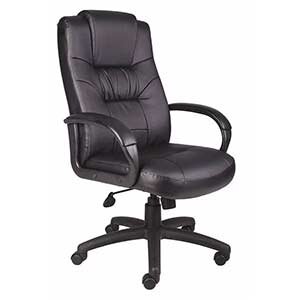 | 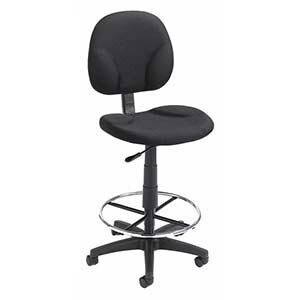 | 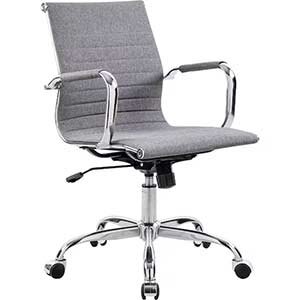 | 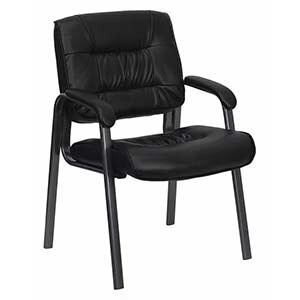 |
| Basic, adjustable, and tough enough for everyday use. Great for shared desks in fast-moving environments. | Built for all-day comfort with adjustable lumbar support, seat depth controls, and backrest height settings. Ideal office chairs for back support if you’re logging hours at a computer reviewing plans or inventory. | Durable and professional-looking, often in leather or faux leather. If you choose these, make sure they have ergonomic adjustments, especially for long meetings. | Perfect for high workbenches, drafting tables, or overseeing operations from a raised desk. Often come with a foot ring for stability. | Streamlined for shorter meetings, but may not offer the comfort needed for extended periods of time. | Practical for waiting areas, breakrooms, or occasional use. |
What to Look for in an Office Chair
When deciding on an office chair, focus on features that keep your team comfortable and working efficiently.
- Seat Height
Height should be adjustable so feet rest flat on the floor, with knees at a 90° angle.
- Seat Depth
There should be enough space to support thighs without pressing into the back of the knees.
- Lumbar Support
Provides essential back support, especially for employees reviewing blueprints or managing schedules.
- Armrests
Make sure they are adjustable to keep shoulders relaxed during data entry or design work.
- Backrest Height
Taller backs help support the upper body during long days.
- Active Sitting
Tilt and recline features keep workers from feeling locked in one position.
Find the Office Chair That Works as Hard as You Do
Not all chairs are built the same, and neither are the jobs you and your team handle every day. This quick comparison chart breaks down the types of office chairs side-by-side so you can see which one fits your workspace, budget, and the demands of your industry.
| Chair Type | Best For | Comfort Level (Short vs. Long Hours) | Durability in Busy Environments | Adjustability Features | Key Considerations |
| Task Chairs | Shared desks, quick tasks, rotating staff | Good for short to moderate hours | High — built for daily use | Basic seat height and tilt; limited lumbar adjustments | Affordable, but not ideal for all-day sitting |
| Ergonomic Office Chairs | Full-day desk work, employees needing back support | Excellent for long hours | High with quality materials | Adjustable lumbar, seat depth, armrests, backrest height, tilt | Best option for productivity and posture support |
| Executive Chairs | Client meetings, office managers, leadership roles | Very comfortable, but varies by model | Medium to High depending on material | Often includes tilt/recline, lumbar support, armrest adjustments | Stylish, but ensure ergonomic features match needs |
| Drafting Chairs | High workstations, drafting tables, standing desk setups | Good for moderate to long use | High | Seat height range for tall desks, foot ring, tilt | Ideal for specialty workstations; check stability |
| Conference Chairs | Meeting rooms, collaborative spaces | Good for short sessions only | Medium | Limited adjustments | Sleek and space-efficient, not built for long sitting |
| Reception / Stackable / Folding Chairs | Guest seating, breakrooms, events | Fair for short-term use | Medium to High | Minimal or no adjustments | Space-saving and versatile, but not for extended desk work |
FAQs
What should I look for in an office chair for industrial use?
Focus on durability, adjustable lumbar support, and easy-to-clean materials.
Which office chairs are best for back support?
An ergonomic office chair with adjustable lumbar support, seat depth, and armrests is ideal.
Is mesh better than leather for a shop office?
Mesh is cooler and easier to maintain in dusty environments. Leather offers a more professional look but may require more upkeep.
Final Thoughts
In construction and manufacturing, your office chair isn’t just for sitting; it’s part of your workflow. The right chair can keep your team comfortable, supported, and focused, whether they’re managing orders, reviewing plans, or meeting with clients. Start with the basics: adjustable height, lumbar support, and a fit that works for your space. Explore our full selection of office chairs today and find the one that will keep your business moving forward, day after day.
Product Compliance and Suitability
The statements contained in this guide are intended for general informational purposes only. Such statements do not constitute a product recommendation or representation as to the appropriateness, accuracy, completeness, correctness, or currentness of the information provided. Information provided in this guide does not replace the use by you of any manufacturer instructions, technical product manual, or other professional resource or adviser available to you. Always read, understand, and follow all manufacturer instructions. Portions of this article were generated in part by ChatGPT, and edited by a member of the Zoro team.
