
This item is Discontinued.
This item is Discontinued.
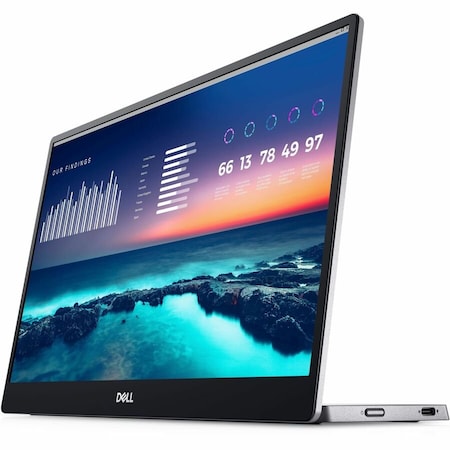
14 in. Full HD Widescreen LED Monitor (Discontinued)
Mfr #
DELLP1424H
Zoro #
G809908207
UPC # 884116452171
Country of Origin China
Category Computer Monitors
Get a 10% off coupon
Free 30-day returns Return Policy
Get 30 days to pay with Net 30 Apply Now
Unlock tax-exempt savings Add Tax Exemption
Specifications
Product Information
MFR #
DELLP1424H
Zoro #
G809908207
UPC #
884116452171
Country of Origin
China
Dimensions
Screen Size
14 in
Width
12.7"
Height
8"
Depth
0.6"
Screen Size Class
14"
Viewable Screen Size
14"
Description
Expand your screen real estate on the go with the Dell 14'' Portable Monitor. Giving you deep colorization in a lightweight and compact form factor, you can easily bring this with you on your travels for optimal productivity outside the office.Sporting a 14'' In-Plane Switching IPS panel, you get a high-quality 1920 x 1080 resolution with support for 16.7 million colors backed by 73% NTSC color gamut space and 300 nits brightness. Experience low latency with 6 ms Gray-to-Gray GtG response time, ensuring your projects and media look smooth while in motion. Colors as well as tints and brightness levels are all properly balanced with a 700:1 contrast ratio. This portable display connects to your DisplayPort-Alt Mode equipped system via included USB-C cable and also offers up to 65W power delivery to ensure your notebook remains powered up when paired with an optional wall charger. An included sleeve enables you to quickly store this display away, keeping it safe and secure while you are traveling. Easily set up your monitor with a single USB-C cable transmitting both video and power for efficient plug and play and quick transitions. Conveniently set up your monitor to the left, right, or behind your laptop; a USB-C port on each side allows for versatility. Work without disruption with power pass through functionality and up to 65W power delivery. Get comfortable anywhere you go, with a continuous tilt stand that bends from 10 to 90 degrees-enough flexibility to keep up with your work. Optimize eye comfort with ComfortView, a feature that reduces harmful blue light emissions. Enjoy a simple on-screen display with quick access buttons for brightness adjustments. Easy Arrange allows you to easily tile multiple applications across one or more screens with pre-set window partitions and the ability to personalize up to four windows, giving you improved multitasking abilities. The Easy Arrange Memory feature remembers where you left off, so applications will go back to where you left them, even after you've unplugged. Shortcut keys can save you even more time, letting you easily configure your display management settings so you can get to work faster. Asset management reports allow IT managers to quickly capture and track monitor information as well as configure multiple monitors at once through a single setup.
Documents & Resources
- Technical Guide 1 Opens PDF in new window
- Technical Guide 2 Opens PDF in new window
- Technical Guide 3 Opens PDF in new window
- Technical Guide 4 Opens PDF in new window
- Technical Guide 5 Opens PDF in new window
- Technical Guide 6 Opens PDF in new window
- Technical Guide 7 Opens PDF in new window
- Technical Guide 8 Opens PDF in new window
- Technical Guide 9 Opens PDF in new window
- Technical Guide 10 Opens PDF in new window
- Technical Guide 11 Opens PDF in new window
- Technical Guide 12 Opens PDF in new window
- Technical Guide 13 Opens PDF in new window
- Technical Guide 14 Opens PDF in new window
- Technical Guide 15 Opens PDF in new window
Restrictions
WARNING:
Cancer and Reproductive Harm
For more information go to
www.P65Warnings.ca.gov
Ratings & reviews
3 reasons you can count on us

Supplies for every job.
10 million items and the exact one you need.

When you need it fast, count on Zoro!
2 million products ship in 1 day.

Stretch your budget further.
Everyday low prices on the brands you love.