
Zoro Homepage
Clipboard Icon Quick Order Cart Icon 0 Cart

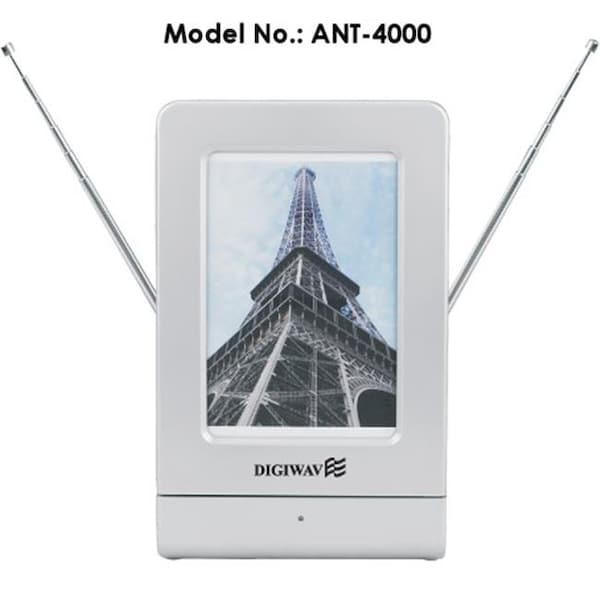
Digiwave ANT4000 Indoor Amplified HDTV Antenna With Smart Technology

  • Mfr # ANT4000

  • Zoro # G504028125


product price: $157.99
/ea
Free Shipping & Returns

Get a 10% off coupon
Free 30-day returns
Return Policy
Get 30 days to pay with Net 30
Apply Now
Real support from real people
Contact our U.S. based team

Specifications

Product Information

MFR #
ANT4000
Zoro #
G504028125
UPC #
-
Country of Origin
China

Description

  • The antenna is designed to receive UHF/ VHF. The model is suitable for digital and analogue, terrestrial TV reception. Suitable for HDTV of various television standards.
  • It is easy to install and convenient to use, built-in high gain and low noise adjustable amplifier.
  • The antenna rack can also serve as a piece of artwork for indoor decoration. A photo can be set to the center square position. Black or white plastic inlay can be replaced. You can choose the black or white plastic inlay to match the picture. Clear acrylic cover is used for protecting picture. For direction on photo replacement, please refer to the relevant illustration.
    ANT-4000 HARDWARE:
    The ANT-4000 antenna package includes the following items:
  • Main Body Indoor Antenna.
  • RF Cable.
  • AC / DC Adaptor.
  • Smart Cable.
  • Smart Connector Converter Box.
    CONNECTING THE ANT-4000
    You can connect the ANT-4000 directly to your TV or use it with a converter box.
    1. To connect the ANT-4000 directly to your TV:
  • Make sure your TV is turned off.
  • Connect the ANT-4000’s RF cable to the antenna input on your TV.
  • Connect the Smart Cable to the small smart connector converter box, and connect the AC / DC adaptor output to the other side of the box.
  • Insert the AC / DC adaptor plug into the 120V / 60Hz socket.
    2. To connect the ANT-4000 to a converter box with smart jack:
  • Make sure your converter box is turned off.
  • Connect the ANT-4000’s RF cable to the antenna input on your converter box, and connect the smart cable to the smart jack of the converter box.
    Connect the converter box to your TV using either audio/video cables or a coaxial cable:
  • a. Audio/Video cable connection: Connect the video (yellow) and stereo audio (red and white) cables to the video and audio outputs on your converter box. Connect the other ends to the video and audio inputs on your TV. Make sure you match the colors of the jacks on each—yellow plug to yellow jack, red plug to red jack, and white plug to white jack.
  • b. Coaxial cable connection: Connect a coaxial cable to the antenna input on yourconverter box.Connect the other end of the coaxial cable to the antenna input on your TV.
    3. To connect the ANT-4000 to a converter box without smart jack:
  • Make sure your TV is turned off.
  • Connect the ANT-4000’s RF cable to the anten
  • Restrictions

    WARNING: Cancer and Reproductive Harm For more information go to www.P65Warnings.ca.gov

    Ratings & Reviews

    3 Reasons You Can Count On Us

    • Supplies for every job.

      Supplies for every job.

      10 million items and the exact one you need.

    • When you need it fast, count on Zoro!

      When you need it fast, count on Zoro!

      2 million products ship in 1 day.

    • Stretch your budget further.

      Stretch your budget further.

      Everyday low prices on the brands you love.