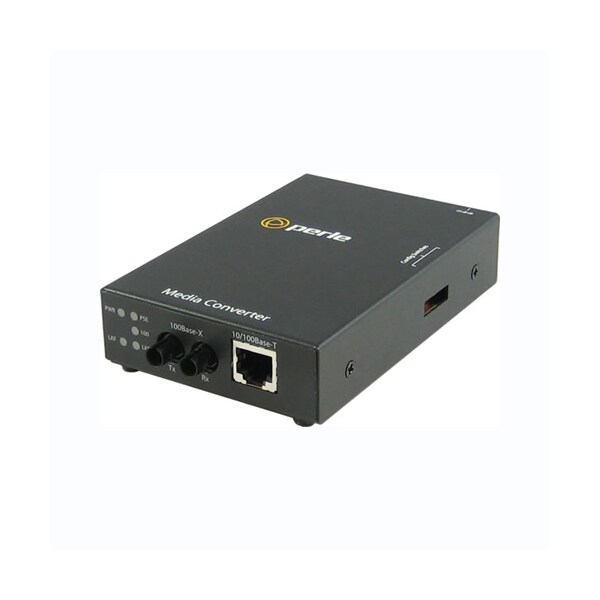
Network Technology
100Base-FX, 10/100Base-TX
Package Contents
S-110PP-M2ST2 Media Converter, Power Strain Relief Strap, AC Adatper
Maximum Distance Supported
1.24 Mile
Form Factor
Rack-mountable, Rail-mountable, Wall Mountable
Weight (Approximate)
11.20 oz
Product Type
Transceiver/Media Converter
Environmentally Friendly
Yes
Number of Network (RJ-45) Ports
1
Product Name
S-110PP-M2ST2 Media Converter
Heat Output ( BTU/HR )
12
Remote Loopback
The media converter can perform a loopback on the 100Base-X fiber interface; Disabled (Default - Up); Enabled- The 100Base-X receiver is looped to the 100Base-X transmitter. The 100Base-TX transmitter is taken off the interface.
Universal AC/DC adapter
100-240v AC, regulated 48vDC adapter included for PoE; 100-240v AC, regulated 56vDC adapter included for PoE+
10/100 Speed
This green LED is operational only when power is applied. The LED is green when the speed of the copper ethernet port is running at 100 Mbps. The LED is off when in 10 Mbps.
Duplex Copper (internal strap)
Full (Default); Half
10/100Base-TX
RJ45 connector; 2 pair CAT5, EIA/TIA 568A/B or better cable for 10/100.
Storage temperature
minimum range of -25 C to 70 C (-13 F to 158 F)
PSE Power
When enabled (UP), the media converter will perform a Power Sourcing Equipment (PSE) function as per IEEE802.3af or 802.3at standards (relevant model); Default is "enabled"
PSE Status
This LED will signify the status of the PSE function. Using multi-color and blinking the unit will show the following status for the PSE; GREEN - Solid: The PSE has successfully detected a compliant PD and is applying power over the UTP (for legacy pin out simply show active power when applied); YELLOW - Solid: The PSE is not active. This means the PSE has been configured to provide power, but the PD is : Not connected; Has not detected a compliant PD and is not applying power; PSE has turned off power for Reset function; OFF - PSE function switch disabled; RED - Blinking: Error Conditions; Capacitance too High - 1 blink; Resistance too Low or short circuit - 2 blinks; Resistance too high or open circuit - 3 blinks
Small Form Factor Pluggable ( SFP ) slot
SFP slot models: Empty slot for 100Base-XSFP modules supplied by Perle,Ciscoor other manufacturers of MSA compliant SFPs; Hot insertion and removable ( hot swappable ).
Operating Humidity
5% to 90% non-condensing
Electrical Safety
UL 60950-1
Power Over Ethernet (PSE)
PoE models: maximum to 15.4 watts supplied to port; PoE+ models: up to 30 watts supplied to port
Emissions
FCC Part 15 Class A, EN55022 Class A
Operating temperature
0 C to 50 C (32 F to 122 F)
Copper link on / Receive activity ( LKC 1/2 )
This green LED is operational only when power is applied. The LED will blink along with transmit/receive data on the 10/100/1000 UTP port; If a loss of link on the copper port results in a Link Passthrough condition to the fiber port, this LED will blink at a rate of once every 2 seconds until the condition is cleared.
PoE Options
Alternative A ( power on pins 1,2 and 3,6 ); Alternative B ( power on pins 4,5 and 7,8 ); Legacy PoE ( IE VoIP phones and wireless access points ) - ( reverse polarity on pins 4,5 and 7,8 ); Legacy large capacitor detect ( pins 4,5 and 7,8 )
Link Pass Through
Disabled (Default)- The 100Base-TX and the 100Base-FX fiber interface operate independently. Far-End Fault indication on the 100Base-FX fiber interface has no effect on the 100Base-TX interface; Enabled- When the state of the receiver is changed on the 100Base-TX interface it is reflected on the 100Base-FX fiber transmitter. When the state of the receiver on the 100Base-FX interface is changed it is reflected on the 100Base-TX transmitter; When a Far-End Fault Indication is received on the fiber interface the 100Base-TX transmitter is turned off. When the Far-End Fault Indication is cleared the transmitter is turned back on.
Operating Altitude
Up to 3,048 meters (10,000 feet)
Storage Humidity
5% to 95% non-condensing
PD Power Reset
This is a technique to perform a power reset on a PD device attached; When enabled ( down ), the media converter will upon loss of link on any fiber port, turn off PSE output power to the PD device for 2 seconds then turn the power back on. The power remains on until any fiber link transitions from up to down again; With Passthrough enabled, a loss of link on the fiber resulting from a loss of link on the copper, a PD Power Reset will occur and the copper link will continue to reflect the state of the fiber link; When PD Power Reset disabled, loss of fiber link has no effect on PSE power to the PD device.
DC Power Requirements
PoE models: 46 - 57 vDC; PoE+ models: 52 - 57 vDC
Power Connector
5.5mm x 9.5mm x 2.1mm barrel socket
Speed Copper (internal strap)
100 (Default); 10
PoE Power Options ( Internal Straps )
Set to Alternative A ( default ): Pins 3,6 Neg, Pins 1,2 Pos; Set to Alternative B: Pins 7,8 Neg, Pins 4,5 Pos; Set to Legacy Pre-Standard: Pins 7,8 Pos, Pins 4,5 Neg
Filtering
1024 MAC Addresses
Buffer
1000 Kbits frame buffer memory
Fiber link on / Receive activity ( LKF 1/2 )
This green LED is operational only when power is applied. The LED will blink along with transmit/receive data on the fiber port; If a loss of link on the copper port results in a Link Passthrough condition to the fiber port, this LED will blink at a rate of once every 2 seconds until the condition is cleared.
Power ( PWR )
This green LED is turned on when power is applied to the media converter. Otherwise it is off. The LED will blink slowly when either fiber port is in Loopback test mode. The LED will blink quickly if there is a hardware failure where the reason code can be identified through a various blinking cycles.
Auto-Negotiation (802.3u)
Enabled (Default)- The media converter uses 802.3u Auto-negotiation on the 100Base-TX interface. It is set to advertise full duplex; Disabled- The media converter sets the port according to the position of the speed and duplex switches.
Fixed Fiber
Multimode dual ST Media Converters; Single strand fiber ( Simplex ) - SC; LC - obtained by inserting an SFP ( LC ) in an SFP slot model
Auto-MDIX (Internal Strap)
If Auto-Negotiation (802.3u) is enabled, the media converter determines the current cable pinout to use on the copper interface. If Auto-Negotiation (802.3u) is disabled the Media converter will use the RX Energy method on the copper interface to set the port MDI or MDIX whichever is appropriate; Enabled (Default) - Either a straight-through or crossover type cable can be used to connect the media converter to the device on the other end of the cable; Disabled - If the partner device on the other end of the cable does not have the Auto-MDIX feature a specific cable, either a straight-through or crossover will be required to ensure that the media converter's transmitter and the partner devices transmitter are connected to the others receiver. The Media converter's 100Base-TX port is configured as MDI-X with this switch setting.
Power Consumption
3.5 Watts