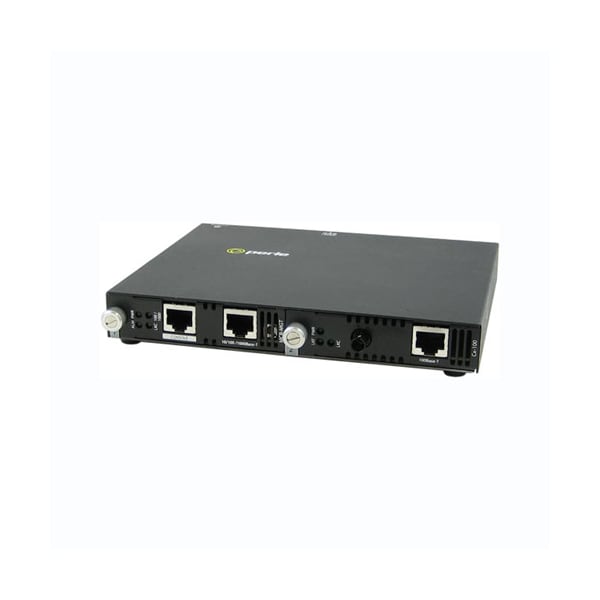
Product Type
Transceiver/Media Converter
Form Factor
Desktop, Rack-mountable, Wall Mountable, Rail-mountable
Product Name
SMI-100-S1ST20D - Fast Ethernet IP Managed Media Converter
Media Type Supported
Twisted Pair, Optical Fiber
Fiber Optic Cable Standard
9/125 µm
Ethernet Technology
Fast Ethernet
Environmentally Friendly
Yes
Network Technology
100Base-BX, 10/100Base-T
Number of Network (RJ-45) Ports
1
Weight (Approximate)
1.59 lb
Package Contents
SMI-100-S1ST20D - Fast Ethernet IP Managed Media Converter, 100-240v AC, Regulated DC Adapter
Maximum Distance Supported
12.43 Mile
Fiber Mode Supported
Single-mode
Power Consumption
3.98watts
Management ethernet port
10/100/1000Base-T - RJ45; Auto- MDI/MDIX
Emissions
FCC Part 15 Class B*, EN55022 Class B*
Management console port
RS232 Serial RJ45 - Cisco pinout for use with standard CAT5 "rolled cable" (crossover) 9600 to 115k bps 7/8 bits Odd,even, no parity 1/2 stop bits Hardware/software flow control DCD/DSR monitoring
Power
Blinking green during startup cycle Steady green: module has power and is ready; Red : error
Fiber Optic Cable
Multimode: 62.5 / 125, 50/125, 85/125, 100/140 micron; Single Mode: 9/125 micron (ITU-T 625)
100/1000
Green - 1000 Mbps link; Yellow - 100 Mbps link; Off - 10 Mbps or no Link
Input Supply Voltage
( 12 vDC Nominal )
Heat Output ( BTU/HR )
13.6
Operating temperature
0 C to 50 C (32 F to 122 F)
Fiber link on / Receive activity (LKF)
This green LED is operational only when power is applied; The LED is on when the 100Base-FX link is on and flashes with a 50% duty cycle when data is received.
Bit Error Rate (BER)
<10-12
Universal AC/DC adapter
100-240v AC, regulated DC adapter included
Operating Altitude
Up to 3,048 meters (10,000 feet)
Auto-MDIX (Strap)
If Auto-Negotiation (802.3u) is enabled, the media converter uses the HP Auto-MDIX method for the 100Base-TX interface. If Auto-Negotiation (802.3u) is disabled the Media converter will use the RX Energy method on the 100Base-TX interface to set the port MDI or MDIX whichever is appropriate; Enabled (Default)- Either a straight-through or crossover type cable can be used to connect the media converter to the device on the other end of the cable; Disabled- If the partner device on the other end of the cable does not have the Auto-MDIX feature a specific cable, either a straight-through or crossover will be required to ensure that the media convertor's transmitter and the partner devices transmitter are connected to the others receiver. The Media Convertor's 100Base-TX port is configured as MDI with this switch setting.
Pause
Pause should be enabled when all devices connected to the media converter support pause. Auto-Negotiation must be Enabled to use this feature; Enabled (Default)- The Media converter will advertise Pause capability during Auto-Negotiation on the 100Base-TX interface; Disabled- The Media converter will advertise that it does not have Pause capability during Auto-Negotiation on the 100Base-TX interface.
Chassis
Metal with an IP20 ingress protection rating
Remote Loopback
The media converter can perform a loopback on the 100Base-X fiber interface; Disabled (Default - Up); Enabled- The 100Base-X receiver is looped to the 100Base-X transmitter. The 100Base-TX transmitter is taken off the interface.
Configuration Mode (Strap)
Auto (default) enable management module to overwrite hardware switch settings; Switch - Use onboard DIP switches
ALM
Red alarm indicator activated when an alert event occurs
Power / TST
This green LED is turned on when power is applied to the media converter. Otherwise it is off. The LED will blink when in Loopback test mode.
Auto-Negotiation (802.3u)
Enabled (Default)- The media converter uses 802.3u Auto-negotiation on the 100Base-TX interface. It is set to advertise full duplex; Disabled- The media converter sets the 100Base-TX port to full duplex.
LKC
Green indicator indicating an active Ethernet link. Blinking indicates RX and TX of data
Operating Humidity
5% to 90% non-condensing
Laser Safety
EN 60825-1:2007
Power Connector
5.5mm x 9.5mm x 2.1mm barrel socket
Copper link on / Receive activity (LKC)
This green LED is operational only when power is applied; The LED is on when the 100Base-TX link is on and flashes with a 50% duty cycle when data is received.
Storage temperature
minimum range of -25 C to 70 C (-13 F to 158 F)
Storage Humidity
5% to 95% non-condensing
Reset button
Recessed pinhole button resets module
Link Pass Through
Enabled (Default)- When the state of the receiver is changed on the 100Base-TX interface it is reflected on the 100Base-FX fiber transmitter. When the state of the receiver on the 100Base-FX interface is changed it is reflected on the 100Base-TX transmitter; When a Far-End Fault Indication is received on the fiber interface the 100Base-TX transmitter is turned off. When the Far-End Fault Indication is cleared the transmitter is turned back on; Disabled- The 100Base-TX and the 100Base-FX fiber interface operate independently. Far-End Fault indication on the 100Base-FX fiber interface has no effect on the 100Base-TX interface.
Electrical Safety
UL 60950-1
100Base-TX
RJ45 connector, 2 pair CAT 5, EIA/TIA 568A/B or better cable; Magnetic Isolation - 1.5kv