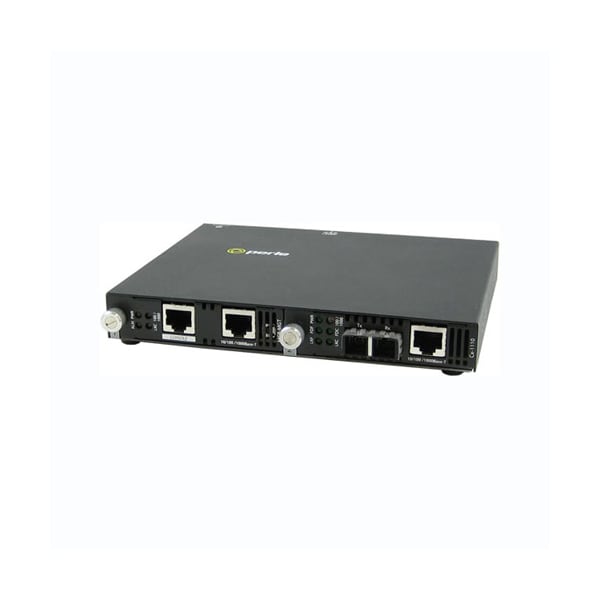
Form Factor
Rack-mountable, Rail-mountable, Wall Mountable
Environmentally Friendly
Yes
Network Technology
1000Base-T, 1000Base-ZX
Number of Network (RJ-45) Ports
2
Package Contents
SMI-1110-S2SC120 Gigabit Ethernet Media Converter, Universal AC/DC Adapter
Product Name
SMI-1110-S2SC120 Gigabit Ethernet Media Converter
Maximum Distance Supported
74.56 Mile
Product Type
Transceiver/Media Converter
Weight (Approximate)
1.59 lb
10/100/1000 Speed
This multi-color LED is operational only when power is applied. The LED is green when the speed of the copper ethernet port is running at 1000 Mbps. The LED is orange when the speed of the copper Ethernet port is running at 100 Mbps. The LED is off when in 10 Mbps.
Storage temperature
minimum range of -25 C to 70 C (-13 F to 158 F)
Buffer
1000 Kbits frame buffer memory
Remote Loopback
The media converter can perform a loopback on the 1000Base-X fiber interface; Disabled (Default - Up); Enabled- The 1000Base-X receiver is looped to the 1000Base-X transmitter. The copper transmitter is taken off the interface.
Auto-Negotiation (802.3u)
Enabled (Default)- The media converter uses 802.3u Auto-negotiation on the 10/100/1000Base-T interface. It is set to advertise full duplex, half duplex, pause and remote fault capabilities; Disabled- The media converter sets the port according to the position of the speed and duplex switches.
Copper Duplex (FDC)
This green LED is operational only when power is applied. The LED is on when the 10/100/1000Base-T link is operatinal in full duplex mode. The LED is off when in half duplex.
Dimentions
175 x 145 x 23 mm
Management console port
RS232 Serial RJ45 - Cisco pinout for use with standard CAT5 "rolled cable" (crossover) 9600 to 115k bps 7/8 bits Odd,even, no parity 1/2 stop bits Hardware/software flow control DCD/DSR monitoring
Power Connector
5.5mm x 9.5mm x 2.1mm barrel socket
Power Consumption
4.1watts
Reset button
Recessed pinhole button resets module
Universal AC/DC adapter
100-240v AC, regulated DC adapter included
Current
0.34amps at 12vdc
Operating Humidity
5% to 90% non-condensing
Emissions
FCC Part 15 Class A, EN55022 Class A
Power
Blinking green during startup cycle; Steady green: module has power and is ready; Red : error
Heat Output ( BTU/HR )
14
Fiber link on / Receive activity (LKF)
This green LED is operational only when power is applied. The LED is on when the 1000Base-X link is on and flashes with a 50% duty cycle when data is received.
ALM
Red alarm indicator activated when an alert event occurs
Input Supply Voltage
( 12 vDC Nominal )
Management ethernet port
10/100/1000Base-T - RJ45; Auto- MDI/MDIX; Single mode dual SC Media Converter
Copper link on / Receive activity (LKC)
This green LED is operational only when power is applied. The LED is on when the 10/100/1000Base-T link is on and flashes with a 50% duty cycle when data is received.
Fiber Duplex (FDF)
This green LED is operational only when power is applied. The LED is on when the 10/100/1000Base-X link is operatinal in full duplex mode. The LED is off when in half duplex.
Speed Copper
100 (Default); 10
Storage Humidity
5% to 95% non-condensing
Laser Safety
EN 60825-1:2007
Fiber Fault Alert
The Fiber Fault Alert switch has meaning when Auto-Negotiation is disabled; Enabled (Default - Up); When the 1000Base-X receiver is off the 1000Base-X transmitter is turned off. Periodically the 1000Base-X receiver will be turned on for a short period to allow the condition to clear if the 1000Base-X link partner is using a similar feature; Disabled (Down)
Filtering
1024 MAC Addresses
Duplex Fiber
Full (Default); Half
Duplex Copper
Full (Default); Half
Operating Altitude
Up to 3,048 meters (10,000 feet)
Auto-MDIX (Strap)
If Auto-Negotiation (802.3u) is enabled, the media converter determines the current cable pinout to use on the copper interface. If Auto-Negotiation (802.3u) is disabled the Media converter will use the RX Energy method on the copper interface to set the port MDI or MDIX whichever is appropriate; Enabled (Default)- Either a straight-through or crossover type cable can be used to connect the media converter to the device on the other end of the cable; Disabled- If the partner device on the other end of the cable does not have the Auto-MDIX feature a specific cable, either a straight-through or crossover will be required to ensure that the media converter's transmitter and the partner devices transmitter are connected to the others receiver. The Media converter's 100Base-TX port is configured as MDI-X with this switch setting.
Operating temperature
0 C to 50 C (32 F to 122 F)
LKC
Green indicator indicating an active Ethernet link. Blinking indicates RX and TX of data
10/100/1000Base-T
RJ45 connector; 2 pair CAT5, EIA/TIA 568A/B or better cable for 10/100; 4 pair CAT5 UTP cable for Gigabit; Magnetic Isolation1.5kv
Power / TST
This green LED is turned on when power is applied to the media converter. Otherwise it is off. The LED will blink when in Loopback test mode.
100/1000
Green - 1000 Mbps link; Yellow - 100 Mbps link; Off - 10 Mbps or no Link
Electrical Safety
UL 60950-1