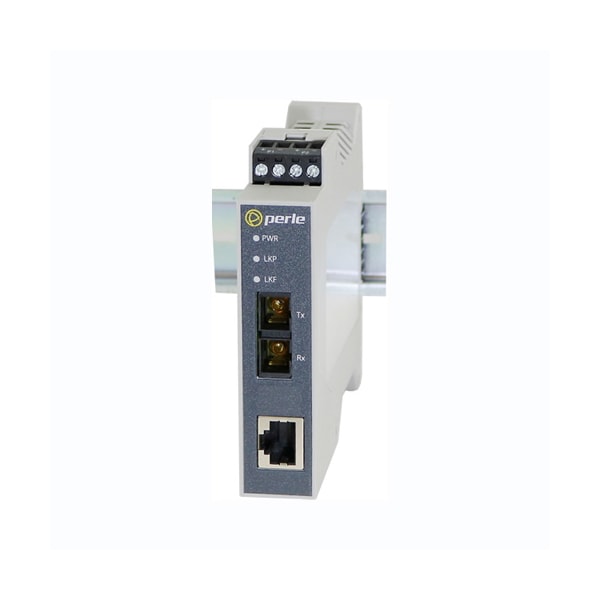
Form Factor
Rail-mountable
Product Name
SR-100-SC2 Transceiver/Media Converter
Maximum Distance Supported
1.24 Mile
Fiber Mode Supported
Multi-mode
Product Type
Transceiver/Media Converter
Number of Network (RJ-45) Ports
1
Network Technology
100Base-TX, 100Base-FX
Media Type Supported
Twisted Pair, Optical Fiber
Ethernet Technology
Fast Ethernet
Power Connector
Dual input Terminal Block and/or T-Bus
Loopback
Disabled (Default-Up): The loopback feature is disabled. This is the normal position for regular operation. The switch must be set to this position for data to pass through the media converter; Enabled: This is a test mode. All data received on the receive (RX) fiber connection is looped back to the transmit (TX) fiber connection. The state of the copper is not relevant and no data or link status is passed through to the copper side.
Storage Humidity
5% to 95% non-condensing
Fiber Optic Cable
Multimode: 62.5 / 125, 50/125, 85/125, 100/140 micron; Single Mode: 9/125 micron (ITu-T 625)
Pause
Auto (Deafult-Up): When Auto Negotiation has been set to Auto, the media converter will use this setting for its Ethernet parameter negotiation on the copper connection; Half: The media converter will not negotiate support for the Pause feature.
Operating temperature
-10 C to 60 C (14 F to 140 F)
Electrical Safety
UL 61010-1 and UL 61010-2-201 (including CB); UL/ULC/EN 62368-1 (including CB); CAN/CSA C22.2 No. 62368-1-14
MTBF (Hours)
694,621 (Calculation model based on MIL-HDBK-217-FN2 @ 30 °C)
100Base-TX
RJ45 connector, 2 pair CAT 5 (UTP or STP) or better cable
Immunity
EN55024; EN 61000-4-2 (ESD); EN 61000-4-3 (RS); EN 61000-4-4 (EFT); EN 61000-4-5 (Surge); EN 61000-4-6 (CS); EN 61000-4-8 (PFMF); EN 61000-4-11; IEC/EN 61000-6-2 (General Immunity for Industrial Environments)
Laser Safety
EN 60825-1:2007
Smart Link Pass-Through
Smart Link Pass-Through (Default - Up): In this mode, the link state on one connection is directly reflected through the media converter to the other connection. If link is lost on one of the connections, then the other link will be brought down by the media converter. If the installation has a media converter on both ends of the fiber link and both are setup for Link Pass-Through, then a loss of copper link on the far end device will propagate through both media converters and will result in a loss of copper link at the near end device. This would, therefore, resemble a direct copper connection; Standard Mode (Down): In this mode, the links on the fiber and copper sides can be brought up and down independently of each other. A loss of link on either the fiber ports or copper ports can take place without affecting the other connection
Power Consumption
2.16 watts (@ 24VDC)
Bit Error Rate (BER)
<10-12
Fixed Fiber
Dual multimode or single mode ( Duplex ) fiber - SC, ST; Single strand fiber ( Simplex ) - SC, ST
Heat Output ( BTU/HR )
7.37
Operating Humidity
5% to 90% non-condensing
Storage temperature
-25 C to 70 C (-13 F to 158 F)
Filtering
1024 MAC Addresses
Fiber link on / Receive activity (LKF)
On: Fiber link present. Blinking slowly: Fiber link disabled because of copper link loss. Blinking quickly: Fiber link present and receiving data. Off: No fiber link present
Operating Altitude
Up to 3,048 meters (10,000 feet)
Copper link on / Receive activity (LKC)
On: Copper link is present. Blinking quickly: Copper link present and receiving data. Blinking slowly: Copper link disabled because of fiber link loss. Off: No copper link present
Buffer
512 Kbits frame buffer memory
Emissions
FCC 47 Part 15 Class A, EN55032 (CISPR32) Class A; ICES-003; EN61000-6-4 (Emissions for industrial environments); CISPR 32:2015/EN 55032:2015 (Class A); CISPR 24:2010/EN 55024:2010; EN61000-3-2
Auto-Negotiation
Auto (Default - Up): In this mode of operation the media converter will negotiate Ethernet parameters on the copper connection. This will ensure the most optimal connection parameters will be in effect. If the copper link partner does not support Auto negotiation, the media converter will default to 100 Mbps and Half Duplex mode; Off: Auto Negotiation should only be turned off, if the copper link partner does not support Auto Negotiation. When the Auto Negotiation switch is set to the OFF position, the media converter will operate at 100 Mbps and Full Duplex mode.
Input Supply Voltage
Triple voltage 12 / 24 / 48 VDC (9.6 - 60 VDC) input supporting: a) 2 x Terminal Block power input and; b) 1 x T-Bus power input
Chassis
Molded plastic DIN Rail case with an IP20 ingress protection rating
Power / TST
This green LED is turned on when power is applied to the media converter. Otherwise it is off. The LED will blink fast/slow when in Loopback test mode or hardware error.